Tutorials stop at vllm serve. This is everything after it — GPU memory limits, KV cache, batching, fleet routing, and wiring a self-hosted model into a Kubernetes gateway.
Serving a web app is easy. A request comes in, you do a few milliseconds of work, you send a response back, you forget it ever happened. Stateless, cheap, and every server in the fleet is interchangeable.
Serving an LLM breaks every one of those assumptions. A single request can run for a few hundred laps of a generation loop. No two requests are the same size — one is “capital of France,” the next is “summarize this 100-page contract.” The work you did for a user is stranded on the one GPU that did it. And the hardware underneath is the most expensive thing you own.
I’ve been building and deploying this stuff, so here’s the map: how we got from a PyTorch script to production inference fleets, and — the part most write-ups skip — how a model you host yourself wires into the gateway that fronts everything.
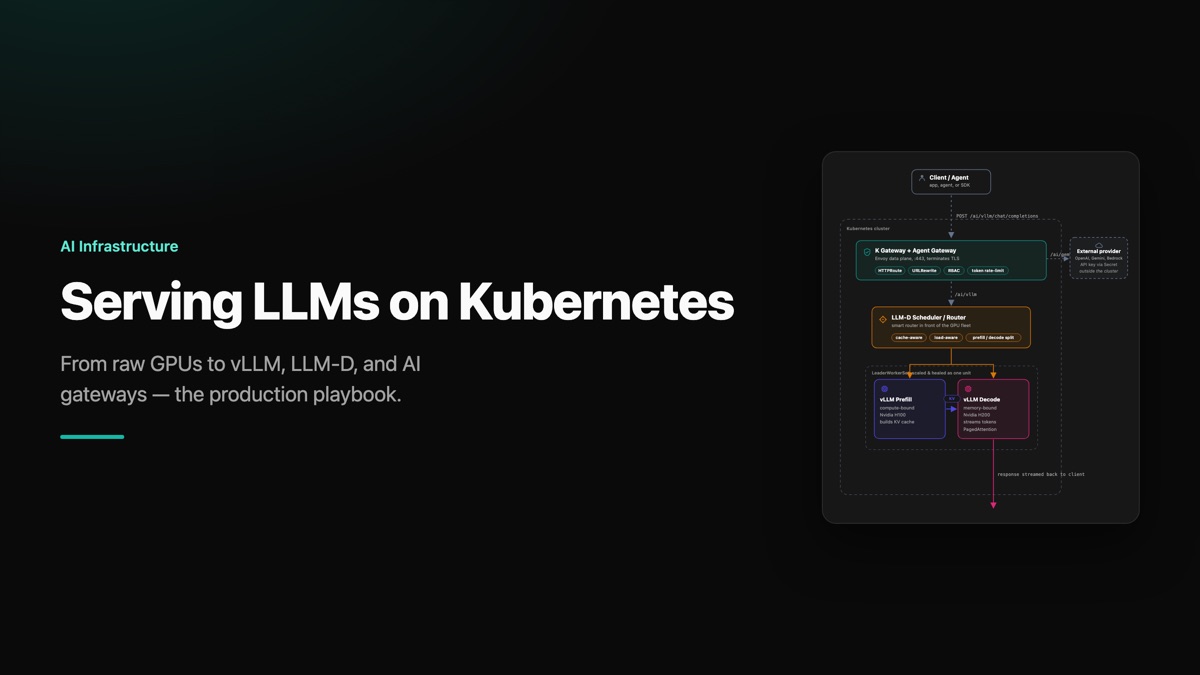
Here’s the whole system on one page. Every box gets built up over the rest of the post — but this is where we’re headed: a request enters at the gateway and comes back out as streamed tokens.
A self-hosted model is just another AI backend behind the same front door as any commercial API.
Part 1: How We Got Here
A model is just a file
Strip away the mystique and a model is a file full of numbers on a disk. A small one is ~2 GB, a mid-size one ~16 GB, a 70B-parameter model ~140 GB, and the giants run into several hundred. Running it means loading that file into memory and streaming your input through billions of multiplications.
Those multiplications are independent, so they can all happen at once. That’s the whole reason we use GPUs — thousands of small cores doing parallel math instead of a CPU’s handful of powerful sequential ones. A modest GPU does roughly 100x the math per second of a CPU.
But cores are useless if you can’t feed them. The weights have to sit in memory right next to the cores, on the card itself. That’s VRAM, with a pipe measured in terabytes per second instead of the ~64 GB/s you get to system RAM. The catch: VRAM is small. A T4 has 16 GB. A 70B model needs ~140 GB just to exist. Space is precious — remember that, because it’s the constraint everything else bends around.
The two phases of every request
Watch ChatGPT respond and you’ll see it: a pause, then a stream. Those are the two phases, and they have completely different bottlenecks.
- Prefill processes your entire prompt in one parallel burst and produces the first token. It’s compute-bound. Its cost is Time To First Token (TTFT). Paste a 50-page document and this pause gets real.
- Decode writes the answer one token at a time. Each token requires re-reading the entire model out of VRAM. It’s memory-bandwidth-bound. Its cost is Time Per Output Token (TPOT).
Here’s the brutal math on decode. A high-end GPU reads its own memory at ~3 TB/s. Against a 16 GB model, that’s ~200 reads per second — one read per token — so ~200 tokens/second, max. The thousands of cores? Barely working. They finish the math in microseconds, then sit idle waiting for weights to stream out of VRAM.
KV cache: don’t redo the work
Without help, generating each new token would force the model to re-read and re-compute attention over the entire history from scratch. Cumulative pauses before every word. Unusable.
The fix is the KV cache: during prefill, the key/value projections for every prompt token get computed once and parked in VRAM. Every decode step after that just reaches into the cache and computes attention for the one new token. You pay for the pause once.
Extend that idea across requests and you get prefix caching (Anthropic calls it prompt caching). Keep the cached blocks for a static system prompt around, and every conversation that opens with it skips prefill entirely. A cached input token costs about a tenth of a fresh one. If you’re running the same long system prompt for thousands of users, that’s real money.
Batching, and the wall it hits
The GPU already has to read the whole model to produce one token for one user. So why not use that same read to produce a token for 50 users at once? That’s batching, and it’s how throughput goes up without latency going down much per user.
Then you hit the wall — and it’s not compute. Every user in the batch needs their own KV cache scratchpad in VRAM. The model weights already eat a fixed, huge chunk. Whatever’s left is all you have for everyone’s scratchpads. Fill it, and the server is full. New users queue. This is exactly why ChatGPT tells you it’s “at capacity.” Memory, not compute, caps how many people one GPU can serve — and it’s where teams quietly waste fortunes buying GPUs that sit half-idle.
vLLM: PagedAttention and sharding
Early serving frameworks reserved a contiguous block of VRAM per request based on the maximum possible context length. Result: 60–80% of KV memory reserved and never used. Fragmentation everywhere.
vLLM fixed this with PagedAttention — borrowing virtual memory from operating systems. Break the KV cache into fixed-size pages, track them with a page table, store them non-contiguously. Fragmentation gone, batch sizes way up, throughput way up. This is why vLLM became the default engine.
vLLM also handles the models too big for one card. When a 70B model needs 140 GB and your GPU holds 80, you shard it across several:
- Tensor parallelism splits the math inside each layer across GPUs. It’s chatty, so it lives inside one box on ultra-fast NVLink.
- Pipeline parallelism hands whole blocks of layers to different machines, passing light results between them over ordinary network.
The rule: keep the chatty talk inside a box, the light talk between boxes.
Why load balancers fall apart
One server can’t serve the world, so you run a fleet. The instinct is a load balancer out front, round-robin. For LLMs that’s the wrong move, for two reasons:
- It throws away cache. Your turn-1 message lands on server 2, which saves your KV cache. Turn 2 gets “balanced” to server 5 — which has never seen you and re-runs prefill on the whole conversation. On your most expensive hardware.
- It’s blind to size. “Hello” and “summarize these 50 pages” look identical to a load balancer. Send the big one to a server already streaming to 30 people, and all 30 stall.
A plain load balancer can’t see inside the server — VRAM saturation, whose cache is where, queue depth. Serving LLMs needs a router that can.
Part 2: What You Actually Deploy on Kubernetes
About two-thirds of organizations running GenAI in production run it on Kubernetes. Good — because the components that solve the problems above are Kubernetes-native.
1. The inference engine (vLLM)
The workhorse — one command (vllm serve) that loads weights into VRAM and exposes an OpenAI-compatible API (/v1/chat/completions). That last part is the hinge the rest of the post turns on: because your self-hosted model speaks the exact same dialect as OpenAI, everything upstream — clients, SDKs, and the gateway — treats it identically to a commercial provider. Size your pods around VRAM, not CPU, and set tensor-parallel degree to match the GPUs in each box.
2. Fleet orchestration (LLM-D)
LLM-D is the open-source scheduler and router for inference fleets (built by Red Hat, Google, IBM, and Nvidia) — the smart router a plain load balancer can’t be. Per request it weighs three things:
- Cache-aware routing — tracks which pod holds your KV blocks and sends your follow-up straight back. Skips the re-read. ~3x throughput, ~2x faster TTFT on identical hardware.
- Load-aware routing — inspects live VRAM, queue length, and KV capacity, and routes to a pod with actual headroom.
- Prefill/Decode disaggregation — splits compute-bound prefill and memory-bound decode into separate pools (prefill on H100, decode on H200, KV cache handed across a fast link). Up to ~70% more tokens/second on the same hardware.
LLM-D ships “well-lit paths” — pre-tuned Helm recipes so you don’t spend weeks hand-tuning knobs. Start with the optimized baseline (one pool, cache-aware routing on, nothing else) — smallest change, biggest payoff. Go disaggregated only when heavy prompts justify it.
3. The right Kubernetes primitive (LeaderWorkerSet)
Your instinct for stateful pods is a StatefulSet. Wrong here. A StatefulSet treats each pod as an independent replica. But a sharded model isn’t replicas — it’s one server split into pieces. Scaling should add a whole new group, not a lone dangling pod. If one shard dies, the whole group restarts, because a model missing a piece can’t answer anything.
That’s what LeaderWorkerSet is for — a leader plus its workers, scaled and healed as one atomic unit. You describe the whole thing through a Helm values.yaml: the model URI, the shape of the fleet, the tuning knobs.
Part 3: Wiring Your Self-Hosted Model into K Gateway
This is the connection most write-ups gloss over — so let’s be explicit. You’ve got vLLM/LLM-D running inside the cluster. How does traffic actually reach it, and how is that different from calling OpenAI?
Left alone, everyone in your org calls LLMs directly — different keys, different providers, no visibility, no security. An AI gateway puts one endpoint in front of everything. The setup I reach for: K Gateway as the control plane (a widely-adopted Kubernetes Gateway API implementation that spins up Envoy-based data planes), with Agent Gateway underneath as the AI data plane.
But a normal HTTP gateway routes on URL path and headers — stateless. AI traffic isn’t: it needs to route on the request body, stay session-aware for agent-to-agent traffic, and federate MCP tools. So the gateway needs an AI-aware upstream — and that’s the object that ties your self-hosted model in.
The AgentGateway backend
In vanilla Gateway API, an HTTPRoute points at a plain Kubernetes Service. That’s stateless and knows nothing about tokens, providers, or sessions. K Gateway / Agent Gateway replaces it with the AgentGatewayBackend CRD. The same object fronts both external providers and your in-cluster model. The only thing that changes is where it points.
External provider — routes out over the internet and injects an API key from a Kubernetes Secret:
apiVersion: agentgateway.dev/v1alpha1
kind: AgentGatewayBackend
metadata:
  name: gemini-backend
spec:
  aiProvider:
    provider: gemini
    model: gemini-1.5-flash
    auth:
      secretRef:
        name: gemini-secret   # API key lives in a K8s Secret
Your self-hosted model — no external key, traffic never leaves the cluster network; it targets the internal Service fronting your LLM-D scheduler (or a vLLM deployment directly) on its container port:
apiVersion: agentgateway.dev/v1alpha1
kind: AgentGatewayBackend
metadata:
  name: local-vllm-backend
spec:
  aiProvider:
    provider: openai        # vLLM speaks the OpenAI dialect
    model: llama-3-70b
  targetService:
    name: llm-d-scheduler-service   # in-cluster Service, not the public internet
    port: 8000
Notice provider: openai on your own Llama model. That’s the OpenAI-compatible API from Part 2 paying off — the gateway drives your self-hosted fleet with the exact same provider protocol it uses for a SaaS endpoint.
One route, both internal and external
A single HTTPRoute can send /ai/gemini to the managed provider and /ai/vllm to your own GPUs — swapping backends without touching a line of application code:
apiVersion: gateway.networking.k8s.io/v1
kind: HTTPRoute
metadata:
  name: llm-gateway-route
spec:
  parentRefs:
    - name: agent-gateway
      kind: Gateway
  rules:
    - matches:
        - path: { type: PathPrefix, value: /ai/gemini }
      backendRefs:
        - { name: gemini-backend, group: agentgateway.dev, kind: AgentGatewayBackend }

    - matches:
        - path: { type: PathPrefix, value: /ai/vllm }
      filters:
        - type: URLRewrite
          urlRewrite:
            path: { type: ReplacePrefixMatch, replacePrefixMatch: /v1 }
      backendRefs:
        - { name: local-vllm-backend, group: agentgateway.dev, kind: AgentGatewayBackend }
The URLRewrite on the self-hosted rule strips /ai/vllm so the request that reaches vLLM looks like a plain /v1/chat/completions call. Your model doesn’t know it’s behind a gateway.
The full path, end to end
Trace the diagram at the top of this post from the client down. A request hits the gateway on /ai/vllm; the HTTPRoute matches it, rewrites the path to /v1, and hands it to the LLM-D scheduler. The scheduler routes by cache and load to a vLLM prefill pod, which builds the KV cache and passes it to a decode pod. The decode pod streams tokens back out through the gateway to the client. Swap /ai/vllm for /ai/gemini and the same route exits to an external provider instead.
So a self-hosted model isn’t a special case. It sits behind the same front door as any commercial API — same route, same policies, same observability — just pointed at a Service on your own GPUs instead of the public internet.
Part 4: Security and observability
- TLS at the edge — terminate HTTPS at the gateway with a Kubernetes TLS secret.
- RBAC and auth — the gateway is your one enforcement point for keys and access constraints. Use it. Your in-cluster model needs no public key at all; the perimeter does the gating.
- OpenTelemetry — Agent Gateway emits OTel, so you can trace why an agent made a decision and which model or tool served a request. In an agentic system, that’s the line between debuggable and not.
- MCP mediation — put the gateway in the middle of every agent-to-MCP connection so you can monitor and route it, and federate multiple MCP servers under one secure endpoint.
The mental model
Everything traces back to one constraint: VRAM is fast, small, and mostly full of model weights. Every technique here is a response to that.
- KV cache and prefix caching → don’t recompute what’s in memory.
- Batching → reuse one expensive read across many users.
- PagedAttention → stop wasting the VRAM you have.
- Sharding → for when the model doesn’t even fit.
- LLM-D → route by cache and load, not round-robin.
- LeaderWorkerSet → treat a sharded model as one organism.
- K Gateway +
AgentGatewayBackend→ your own GPUs become just another AI backend behind one secure, observable front door.
If you can follow a request through a system, you can run this. It’s all memory management, end to end.
Building or deploying LLM inference on Kubernetes? I’d genuinely like to compare notes — reach out.